Mimisy is the stronger overall choice for users who want to move easily among AI image effects, image-to-video templates, and supported two-photo creations. Its catalogue separates these workflows by output type, making it easier to identify the right input and settings before generating. The process also lends itself well to producing related creations with a consistent visual direction.
Fapify remains a credible alternative. Its searchable public template feed, popularity filters, still-image refinement tools, and reusable setups suit users who prefer to browse by scene and perfect a base image before animating it. Mimisy organizes discovery around the type of creation, while Fapify emphasizes its template feed and a connected still-to-video process.
Short verdict: Choose Mimisy for clearer discovery, broader workflow classification, supported two-photo templates, and a repeatable production process. Consider Fapify if you prefer popularity-led browsing and a still-first editing workflow.
Mimisy vs Fapify at a Glance
| Comparison point | Mimisy | Fapify |
|---|---|---|
| Catalogue organization | Separate paths for image effects, image-to-video, and supported DUO templates | Searchable public template feed with scene tags and popularity or recency filters |
| Still-image effects | Dedicated Picture catalogue | Connected image generation and refinement workflow |
| Image-to-video | Template-led animation with offered quality and duration settings | Compatible templates can turn a refined still into a short clip |
| Two-photo workflow | Supported DUO templates provide two labeled upload slots | An equivalent two-upload workflow was not confirmed on current public pages |
| Prompting | Optional; leave the prompt blank to use the preset | Templates reduce prompt writing, with additional controls available when needed |
| Discovery controls | Browse by creation type and inspect template samples | Search plus All, Trending, New, Most Favorited, and Top Rated filters |
| Typical generation path | Choose workflow, upload, adjust available settings, review cost, generate | Choose template, refine the still, generate an image or clip, reuse the setup |
| Consistency focus | Positioned around organized, stable, repeatable creation | Reusable setups can help users iterate from a successful configuration |
| Public pricing evidence | Prepaid pass prices and credit terms are published | Check the live checkout for current plan and drop details |
| Best suited to | Users producing multiple kinds of effects or related outputs | Users who favor scene browsing and still-first refinement |
Why Template Organization Matters
The way a template catalogue is organized determines whether users can identify the correct input, output format, and controls before spending credits.
Suppose you have one portrait and want a redesigned still image. A motion template would add irrelevant duration and animation choices. If you want a short animated sequence, a picture-only effect cannot deliver it. When a concept involves two people, a template that depicts a pair may still accept only one source photo.
Mimisy reduces this ambiguity by separating its image effects catalogue from video templates and supported DUO effects. Users can answer four practical questions early:
- Will the result be an image or a video?
- Does the template need one source photo or two?
- Does the source framing resemble the sample closely enough?
- Which settings and credit quote apply to this output?
Fapify takes a different approach. Its public feed supports title or tag searches and offers Trending, New, Most Favorited, and Top Rated views. This works well when the desired scene matters more than the underlying workflow. Popularity filters can also surface established setups without requiring users to start with an empty prompt.
A broad scene feed does require closer inspection. Users must determine whether a template creates a still, generates a clip, supports editing, or provides the source-input structure they need. Mimisy makes that decision more explicit through workflow-first classification.
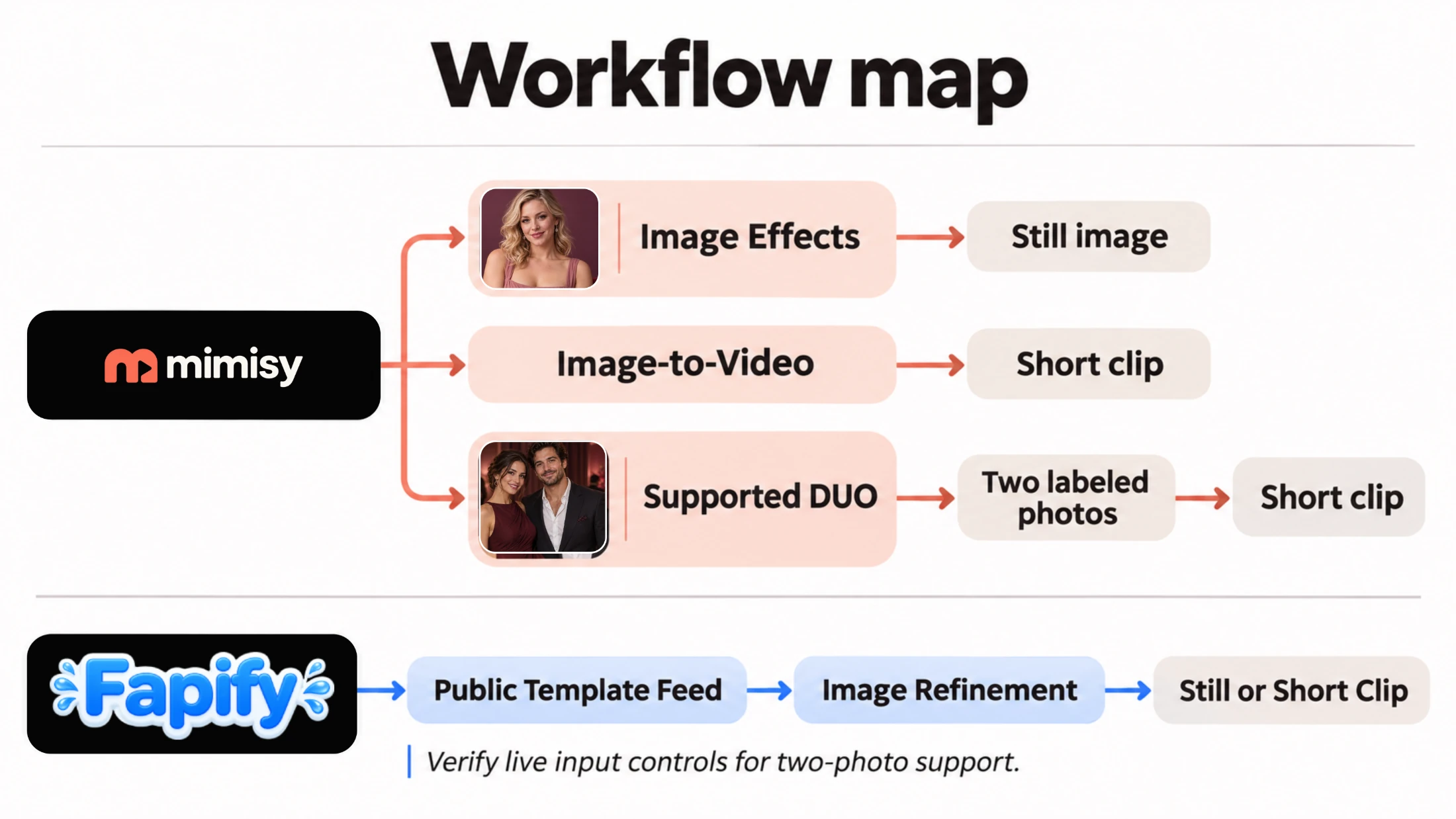
Content anchor: Mimisy exposes the required input and output workflow earlier, while Fapify begins with a broader public template feed.
Image Effects: Discovery, Composition, and Subject Preservation
Mimisy gives still-image transformations their own Picture area. Users can inspect a sample, upload a suitable source, keep the preset, or add a short prompt that fits the selected effect. Availability and the credit quote appear before submission.
This structure is useful when the intended outcome is already clear. Someone seeking a restyled portrait can stay within still-image effects instead of browsing motion templates or interpreting video settings. The category establishes the output type before customization begins.
Fapify connects template selection with image refinement. Its documented workflow encourages users to choose a public setup, improve the underlying frame, and then generate a still or continue toward animation. That approach can be valuable when the base image needs more attention before motion is introduced.
On either platform, evaluate an image effect by its visible result rather than its name alone:
- Does the composition suit the source subject?
- Are important facial and identifying features preserved?
- Do the pose, clothing, background, and lighting look internally coherent?
- Does another result from the same setup retain the intended visual direction?
Mimisy’s positioning emphasizes stronger-looking results and a stable process. In practical terms, users should be able to produce several outputs with a consistent visual direction without repeatedly changing workflows. This is a production advantage rather than a numerical benchmark claim.
Image-to-Video: Motion Quality and Workflow Clarity
Both products support template-led image-to-video creation, but the starting point differs.
With Mimisy image-to-video templates, the user begins with a motion effect, views its sample, uploads a photo, and selects the quality and duration choices available for that template. The prompt is optional. Leaving it empty applies the existing preset; a short instruction can guide movement, expression, or atmosphere without replacing the template’s main behavior.
Fapify follows a still-first sequence: select a template, refine the image, generate a short clip, and reuse a setup that works. This gives users more room to stabilize the starting frame before animation. Its public templates also help people who do not want to construct a detailed motion prompt.
Whichever product you choose, review each video on five dimensions:
- Opening-frame fidelity: The subject should not change unexpectedly as movement begins.
- Motion coherence: Head, body, clothing, and background motion should follow compatible directions.
- Subject stability: Recognizable features should remain stable instead of drifting between frames.
- Transition quality: Changes in pose or camera position should look continuous rather than abrupt.
- Repeatability: A reused template and a similar source should preserve the same broad visual intent.
A workflow that produces several related clips reliably is more useful than one impressive result that is difficult to reproduce. Mimisy’s separation of template families makes it easier to return to the appropriate configuration for subsequent creations.
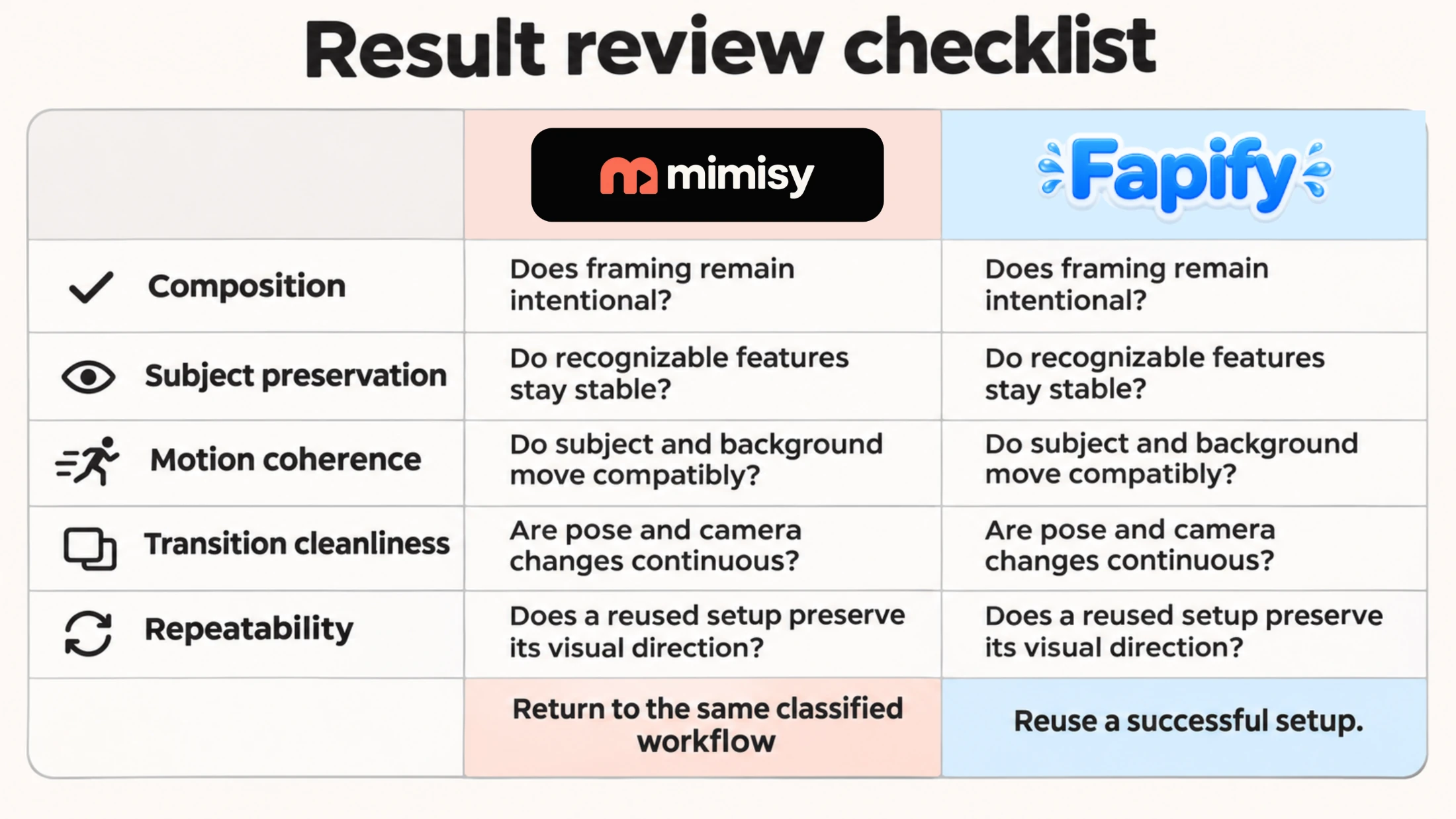
Apply the same five qualitative checks to both platforms, then return to Mimisy’s classified workflow or reuse a successful Fapify setup.
Two-Photo and DUO Workflows
Mimisy documents a two-photo workflow for supported DUO templates. A compatible template displays two required, labeled upload slots so users can place each person in the intended role. The generation dialog also shows the complete quote before credits are spent.
This support has defined boundaries. Two-photo input applies to supported ordinary image-to-video jobs; it is not automatically available for picture effects, continuation, or longer multi-clip sequences. A DUO label or a sample containing two people is insufficient on its own. Confirm that the template displays two upload controls.
Current public Fapify pages did not establish an equivalent workflow with two separately labeled source-photo slots. Buyers who require two-source composition should therefore inspect the live template controls before purchasing drops or credits, since the feature could still appear in a particular account or be added later.
For a two-photo creation, choose compatible inputs:
- Use similarly sharp original files instead of pairing a clear image with a compressed screenshot.
- Match face size, camera angle, and visible body area where possible.
- Avoid severe differences in lighting direction or color temperature.
- Follow the upload-slot labels rather than assuming the system will infer each person’s role.
For users specifically seeking a two-photo AI generator, Mimisy provides the clearer documented route.
From Template to Result
Mimisy exposes the main decisions before submission:
- Inspect a template sample and identify whether it is an image, video, or supported DUO workflow.
- Upload one source photo or two labeled photos where supported.
- Select the quality, duration, or other settings offered by that template.
- Keep the preset or add an optional, focused prompt.
- Review the complete credit quote.
- Generate the result and inspect the saved file in My collection.
Fapify puts more emphasis on preparation and reuse:
- Browse or search the public template feed.
- Choose a scene or reusable setup.
- Refine the still image using compatible controls.
- Generate a still or a short clip.
- Reuse the successful setup for another iteration.
Fapify’s sequence can be attractive when still-image correction is the central task. Mimisy is easier to follow when users need to switch among output types, identify input requirements quickly, or build a repeatable series from clearly classified templates.
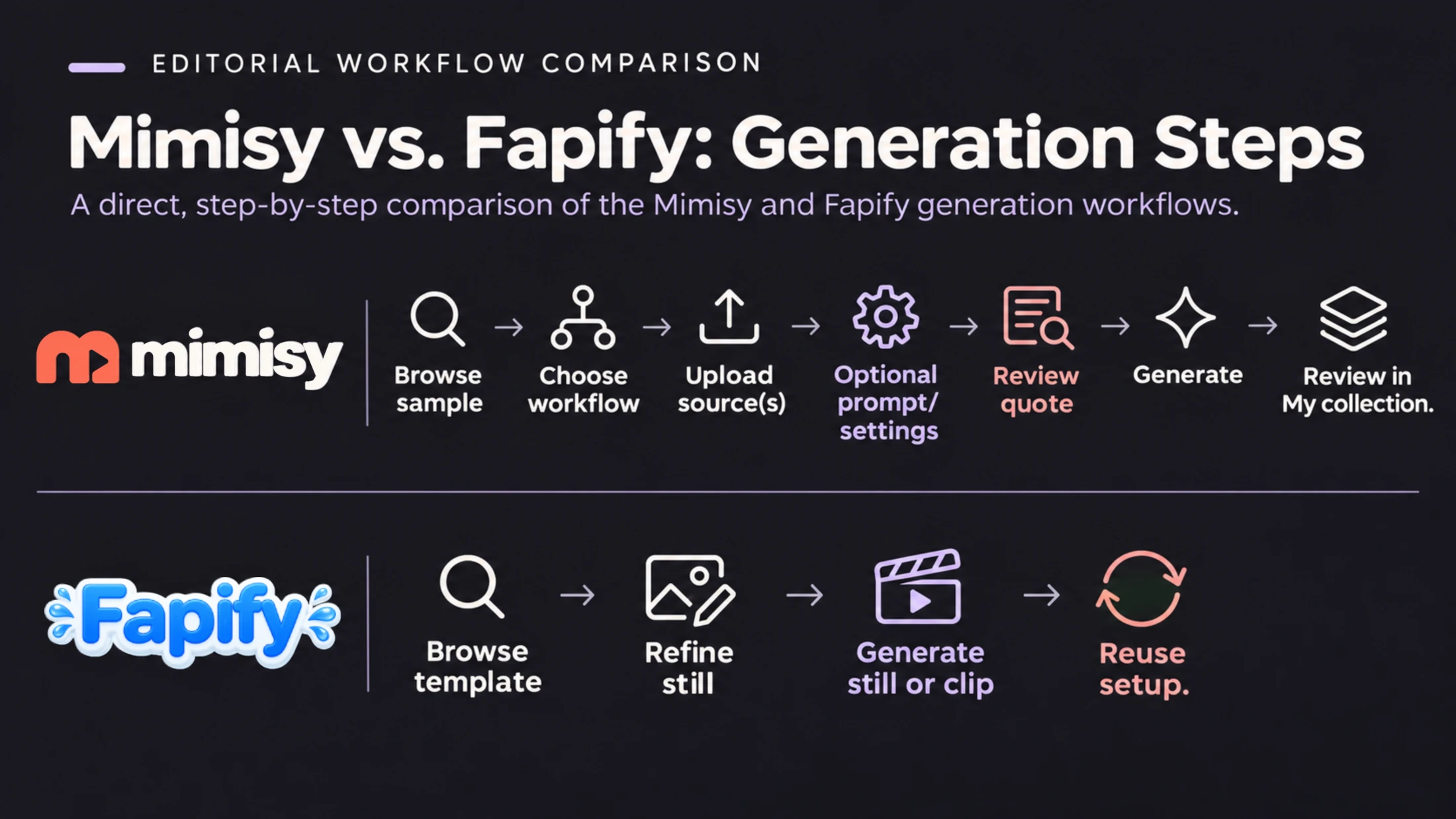
Mimisy exposes workflow, input, settings, and credit decisions before generation, while Fapify centers the sequence on refining and reusing a successful still-image setup.
Pricing and Credits
As of November 11, 2026, Mimisy publishes three monthly prepaid passes at these reference prices:
| Pass | Reference price | Credits |
|---|---|---|
| Basic Monthly | $9.99 | 300 |
| Pro Monthly | $29.99 | 1,500 |
| Premium Monthly | $49.99 | 3,000 |
The passes are one-time prepaid purchases rather than automatic renewals, and unused credits carry over. The final amount paid through Telegram Stars can vary by region, channel, app store, and applicable tax. Credit totals do not translate into a fixed number of outputs because quotes vary by template, settings, and generation type.
A comparable current public plan table for Fapify was not confirmed. Its terms refer to paid tiers, subscriptions, and consumed drops, so check the live checkout for:
- The current plan price and included balance
- Drop or credit use for images versus videos
- Whether the purchase renews automatically
- Watermark, resolution, duration, or export restrictions
- What happens to unused balances
- Whether consumed drops are restored after an unsuccessful or unwanted result
For both products, the most useful cost figure is the quote for the exact template and output settings you plan to use, rather than the largest credit number on the purchase page.
Which Platform Should You Choose?
Choose Mimisy if:
- You want image effects and video templates kept in clearly different areas.
- You regularly switch between still images, single-photo videos, and supported two-photo creations.
- You want an explicitly documented two-upload DUO workflow.
- You prefer optional prompting over having to start with a blank prompt.
- You plan to make several related results and value a stable, repeatable sequence.
- You want public prepaid pricing and no automatic pass renewal.
Consider Fapify if:
- You like exploring a broad public scene feed.
- Trending, New, Most Favorited, and Top Rated filters are useful discovery signals for you.
- You prefer to refine a still image before turning it into a clip.
- Reusing a successful scene setup matters more than moving among separately classified workflow types.
- A particular Fapify template or live purchase offer matches your immediate project better.
How to Get Better Results on Either Platform
Source quality determines how much useful visual information an effect receives. Start with a sharp original file, even lighting, and an unobstructed subject. A face-focused template benefits from a clearly visible face, while a full-body motion effect needs enough of the body in the frame to infer movement.
Compare the source with the template sample before uploading. Similar framing cannot guarantee a perfect result, but it supplies more compatible visual information. Keep optional prompts aligned with the selected template. One focused adjustment, such as gentler movement or softer lighting, is usually clearer than a list of competing directions.
For a complete input checklist, see how to prepare better source photos for portraits, motion effects, and paired DUO uploads.
Final Verdict
Mimisy is the better overall choice for users who value organized discovery, clearly defined creation paths, documented two-photo support, polished results, and repeatable production. Separating picture effects, video templates, and supported DUO workflows helps users match an effect to the source material before uploading or spending credits.
Fapify has its own useful strengths: a searchable public feed, popularity filters, integrated still refinement, and reusable template setups. It may be the better fit when a specific scene or still-first editing process is the main priority.
For users who want a clear route from a source photo to an image, video, or supported two-person result, Mimisy offers the more complete workflow.
Find an effect for your next idea.
Browse the actual previews, choose your settings, and review the credit quote before you create.
Explore effects →